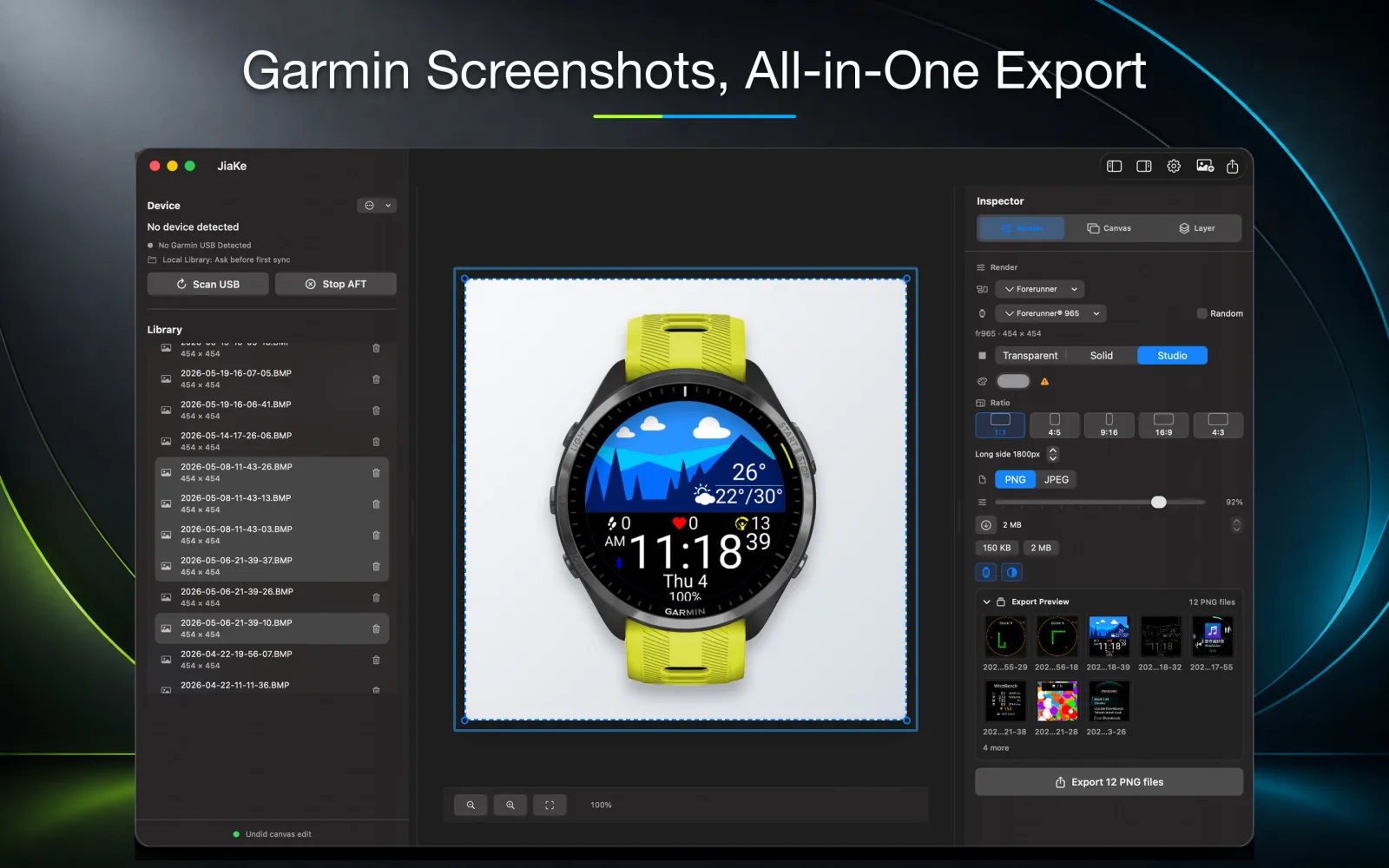
If you prepare screenshots for Garmin apps, data fields, widgets, or watch faces, the expensive part is usually not the screenshot itself. The cost comes after capture: file transfer, cleanup, framing, compression, and repeated exports.
JiaKe is not a general-purpose design tool. It is built around one specific job: turning real Garmin BMP screenshots into framed mockups and reusable release assets.
Here are 10 reasons to use JiaKe.
1. MTP reading optimized for Garmin watches
Garmin screenshots are usually BMP files on the watch storage, not ordinary images in a photo library. On macOS, finding and reading those files can add friction before the design work even starts.
JiaKe treats this as a core workflow. It is designed around Garmin watch screenshot storage and the MTP path developers actually use when preparing Connect IQ assets.
- Built for Garmin screenshot folders and BMP source files.
- Useful for repeated imports from real Garmin watches.
- Reduces the time spent finding and confirming screenshot files before each release.
2. Automatic local copy instead of manual dragging
The manual workflow usually means connecting the watch, opening Android File Transfer, drilling down to GARMIN/SCRNSHOT, and dragging screenshots into a local folder.
JiaKe automates that part of the workflow. After the watch is connected, screenshots can be copied into a local directory and used directly for mockup production. You no longer need to keep dragging files around in Android File Transfer or tolerate slow refreshes, freezes, and inconsistent transfer behavior.
3. Built-in high-quality watch frames
Manual mockup work often stalls when you need a frame asset. The frame might be inaccurate, the screen opening might not match the screenshot, or the layer order may need cleanup before the image looks believable.
JiaKe includes device frames, so you do not need to search through old files, asset libraries, or design templates every time you prepare a Garmin screenshot. Choose the screenshot, choose the frame, and focus on the final presentation.
4. No need to open Photoshop for a simple mockup
Photoshop, Figma, and Sketch can all create screenshot mockups, but they are not focused on the Garmin screenshot release workflow. Opening a heavy design tool, finding frame assets, creating masks, arranging layers, and exporting a few Connect IQ screenshots can be too much overhead.
JiaKe handles most Garmin screenshot mockup tasks directly: import, frame, style, preview, and export. For routine release assets, you do not need to start a large design application.
5. A clear interaction flow made for mockups
General design tools give you freedom, but every step becomes your responsibility. You decide where the screenshot goes, how the frame is layered, how large the board should be, whether the file needs compression, and how repeated exports should be handled.
JiaKe makes the path more direct: choose a screenshot, choose a device frame, choose a preset style, review the output, and export. Because the tool is made for mockup creation, the workflow stays easier to repeat.
6. Multiple formats and file-size limits for store assets
Connect IQ Store images have practical file-size limits. Hero Image, Cover Image, and Screen Images have different constraints, and manually exporting and compressing every image can slow down a release.
JiaKe supports multiple export formats and file-size limits. That means image compression can become part of the export workflow instead of a separate step after every manual export.
7. Preset board styles for complex multi-image layouts
Release assets are not always single screenshots. You may need multi-image compositions, long canvases, social posts, product-page headers, or a consistent set of feature images.
JiaKe includes multiple board presets, making it easier to create complex images from several screenshots. You do not have to rebuild the layout from a blank canvas each time.
8. Batch export with a fixed style
When a release needs several screenshots, the biggest time saving comes from batch handling. Once the frame, board style, and export settings are fixed, every screenshot should follow the same rules.
JiaKe supports exporting multiple files at once. A screenshot set can keep the same style and output requirements, which is especially useful when you maintain several Connect IQ apps or update Garmin screenshots often.
9. Powerful stylesheet support for complex styles
Simple screenshots can use presets, but complex release assets often need finer control over background, spacing, boards, frames, layout, compression, and output rules.
JiaKe supports a stylesheet-oriented workflow for capturing those visual and export decisions. Instead of rebuilding complex styles by hand for every image, you can reuse fixed rules so a whole screenshot set stays consistent.
- Useful for maintaining a consistent brand style.
- Useful for multi-screenshot boards and multiple output sizes.
- Useful when one tuned style should be reused for later batch exports.
10. Clear docs, LLM-friendly workflows, and command-line support
A tool is easier to fit into a release process when it has clear documentation and automation entry points. JiaKe is designed not only for manual use, but also for documented and command-line workflows.
Clear documentation can be exposed to LLMs so they can understand your screenshot goals, project assets, and export rules, then help you plan operations or command-line flows. For teams that publish Connect IQ apps often, this makes screenshot mockups easier to include in a broader release pipeline.
- Clear docs help teams and LLMs understand the workflow.
- Command-line support helps automate repeated exports.
- Useful for connecting screenshot mockups with release scripts, docs, and content workflows.
FAQ
Who is JiaKe for?
JiaKe is for Connect IQ developers, watch face designers, product creators, and anyone who needs to turn Garmin screenshots into framed release assets.
Can JiaKe replace Photoshop?
For Garmin screenshot mockups, device frames, preset boards, and batch release exports, JiaKe can replace that part of the workflow. For broad freeform design work, a full design tool can still be useful.
Can JiaKe help prepare Connect IQ Store images?
Yes. JiaKe helps turn real Garmin screenshots into export images for Connect IQ Store listings, product pages, documentation, and launch posts while reducing manual compression and repeated exports.